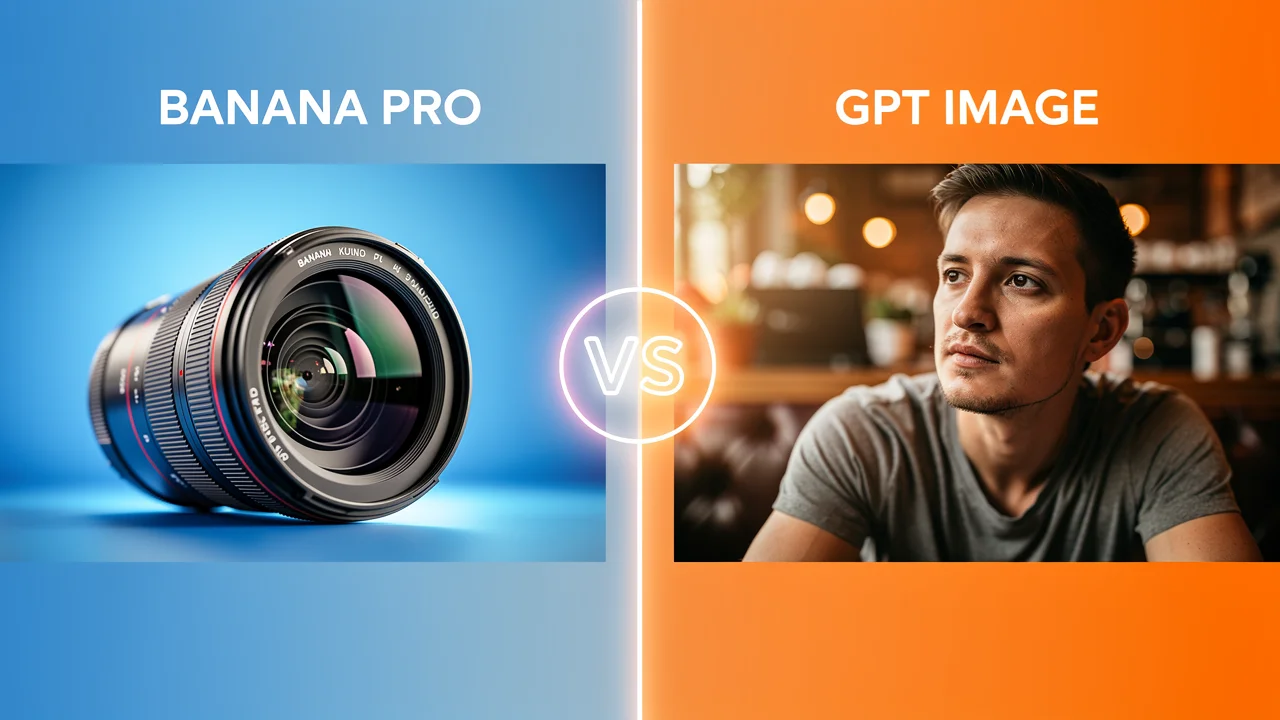
Choosing between Nano Banana Pro and GPT Image comes down to what you value more: precision or realism. Nano Banana Pro wins on resolution and text accuracy; GPT Image wins on natural lighting and creative flexibility. We tested both across five real-world scenarios — photorealism, text rendering, complex layouts, character consistency, and image editing — and the results might surprise you.
Both models represent the cutting edge of AI image generation in 2026. OpenAI's GPT Image 1.5 brought faster generation and more natural-looking output, while Google's Nano Banana Pro pushed resolution to 4K and dramatically improved text rendering. But which one should you actually use? Let's break it down.
TL;DR — Quick Answer
| Feature | Nano Banana Pro | GPT Image 1.5 | Winner |
|---|---|---|---|
| Max resolution | 4K (native) | 1024×1024 (upscale to 2K) | Banana Pro |
| Text rendering | Excellent | Good | Banana Pro |
| Photorealism | Polished | Natural | GPT Image |
| Character consistency | High | Medium | Banana Pro |
| Generation speed | Moderate | Fast | GPT Image |
| Creative flexibility | Good | Excellent | GPT Image |
| Image editing | Precise | Creative | Tie (depends on use case) |
| Best for | Professional design, branding | Creative work, artistic imagery | — |
Bottom line: If you need high-resolution, text-heavy, or brand-consistent images, go with Nano Banana Pro. If you want natural-looking, creative visuals quickly, go with GPT Image.
What Is GPT Image?
GPT Image is OpenAI's native image generation model, integrated directly into ChatGPT. The latest version, GPT Image 1.5, marked a significant leap forward — it generates photorealistic images, renders text within images, and supports multi-step editing instructions in a single prompt.
Unlike earlier image generators that produced AI images with an obvious "synthetic" look, GPT Image 1.5 creates output that's often indistinguishable from real photographs. It handles creative prompts exceptionally well, understanding nuanced artistic directions like "cinematic lighting with a warm golden hour feel" or " editorial photography style with shallow depth of field."
Key capabilities of GPT Image 1.5:
- Native text rendering within images
- Multi-step instruction following
- Photorealistic portrait and scene generation
- Style-consistent generation across multiple prompts
- Fast generation times (typically 10-20 seconds)
You can try GPT Image on Kairval alongside other leading models to compare outputs directly.
What Is Nano Banana Pro?
Nano Banana Pro is Google's flagship image generation model, built on the Imagen architecture. It launched in late 2025 and quickly gained attention for its ability to generate high-resolution images (up to 4K natively) with remarkably accurate text rendering.
The "Pro" designation sets it apart from the base Nano Banana model. While Nano Banana focuses on speed and general-purpose image generation, Nano Banana Pro targets professional workflows — graphic design, marketing materials, product mockups, and any scenario where pixel-perfect output matters.
Key capabilities of Nano Banana Pro:
- Native 2K and 4K resolution output
- Industry-leading text rendering accuracy
- Strong character and style consistency across generations
- Precise layout control for complex compositions
- Professional-grade editing with minimal artifacts
For a deeper dive into what this model can do, check out our AI text-to-image tool where you can test Nano Banana Pro with your own prompts.
Head-to-Head Comparison: Real-World Tests
We tested both models across five scenarios that reflect what creators and professionals actually need. Each test used the same prompt for both models to ensure a fair comparison.
Test 1: Photorealism and Lighting
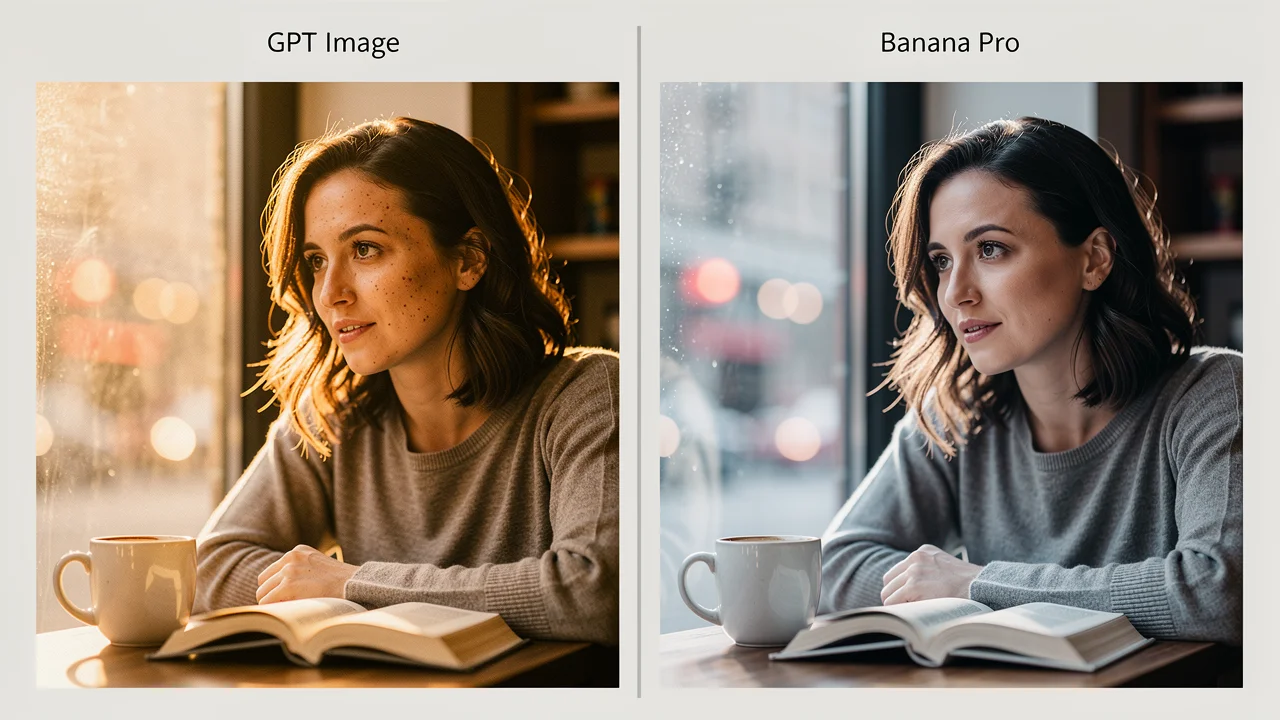
Prompt: "A close-up portrait of a woman in her 30s sitting at a coffee shop window, soft natural light filtering through, book in hand, candid moment, shot on 85mm lens at f/1.4"
GPT Image 1.5 produced the more natural-looking result. The lighting felt organic, with soft shadows and authentic skin texture. The coffee shop background had a genuine bokeh effect that matched the f/1.4 specification.
Nano Banana Pro delivered a sharper, more polished image. Every detail was crisp — perhaps too crisp for a candid photo. The result looked professional but slightly "studio-lit" rather than naturally lit.
| Metric | GPT Image 1.5 | Nano Banana Pro |
|---|---|---|
| Realism | 9/10 | 7/10 |
| Lighting accuracy | 9/10 | 7/10 |
| Sharpness | 7/10 | 9/10 |
| Overall | 8.3/10 | 7.7/10 |
Winner: GPT Image 1.5 — better for photorealistic, natural-looking images.
Test 2: Text Rendering Accuracy
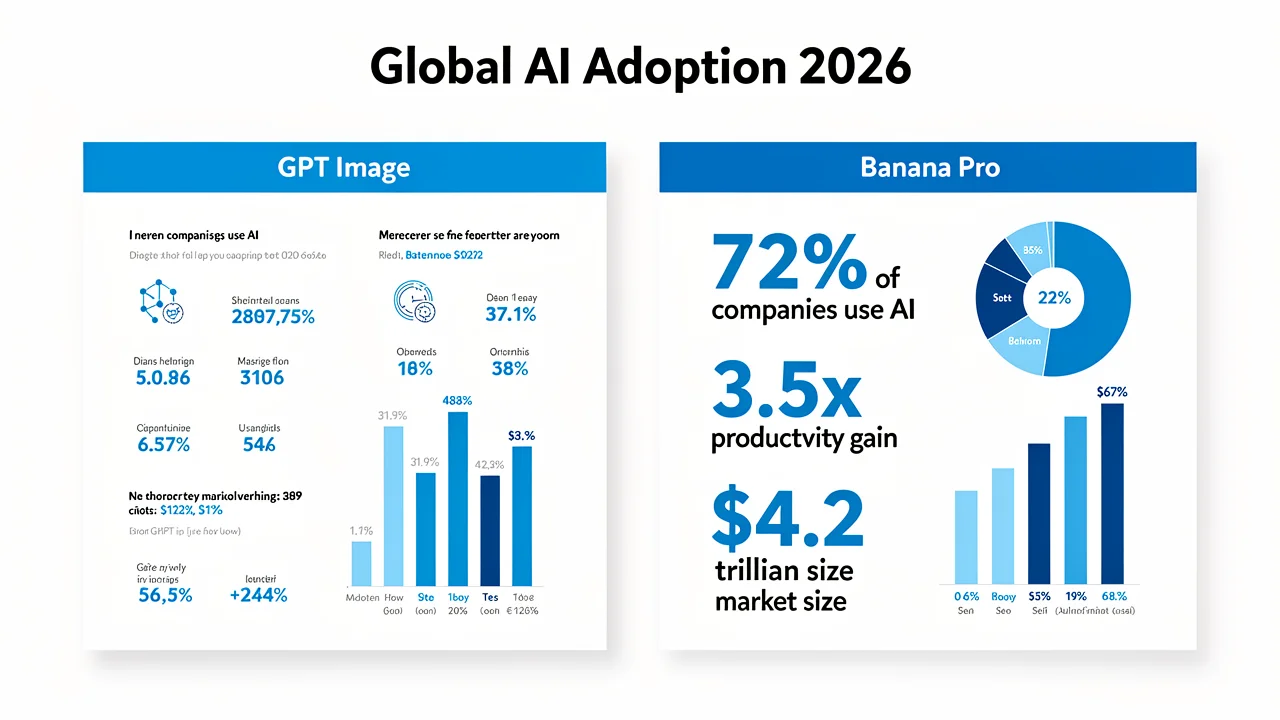
Prompt: "A professional infographic titled 'Global AI Adoption 2026' showing three statistics: '72% of companies use AI', '3.5x productivity gain', and '$4.2 trillion market size'. Modern design, blue and white color scheme."
Nano Banana Pro nailed the text. All three statistics were rendered correctly, the title was crisp, and the layout hierarchy was clear. This is where Nano Banana Pro's text rendering advantage becomes undeniable.
GPT Image 1.5 produced an attractive infographic visually, but two of the three statistics had typos. "72%" became "71%", and "$4.2 trillion" was rendered as "$4.2 billion". The layout was appealing but the content was inaccurate.
| Metric | GPT Image 1.5 | Nano Banana Pro |
|---|---|---|
| Text accuracy | 5/10 | 10/10 |
| Layout quality | 8/10 | 9/10 |
| Visual appeal | 8/10 | 8/10 |
| Overall | 7.0/10 | 9.0/10 |
Winner: Nano Banana Pro — dramatically better text rendering for professional content.
Test 3: Complex Layout Generation
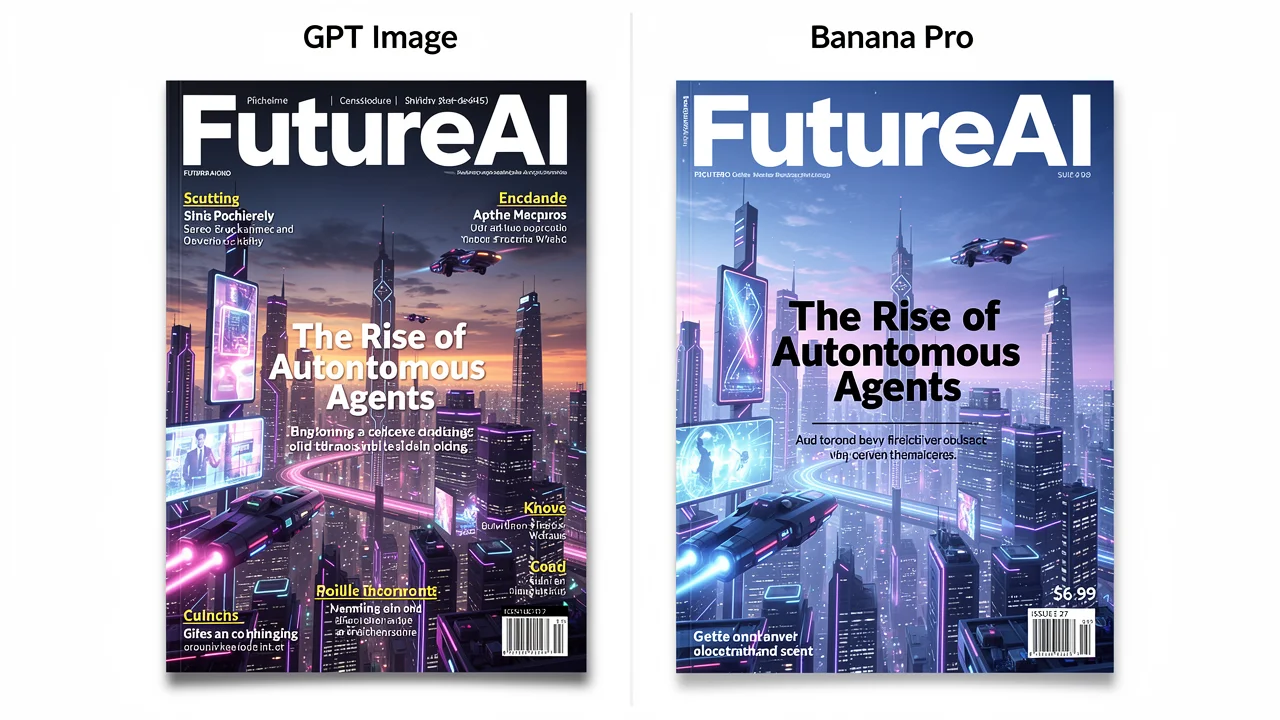
Prompt: "A magazine cover for a tech publication called 'FutureAI'. Feature story headline: 'The Rise of Autonomous Agents'. Subheadline: 'How AI is learning to work independently'. Include barcode, price '$6.99', and a futuristic cityscape background."
Nano Banana Pro created a magazine cover that could pass for a real publication. The headline text was crisp, the layout was professional, the barcode looked authentic, and the price was correct. The futuristic cityscape complemented the text elements without overwhelming them.
GPT Image 1.5 generated a visually striking cover with a beautiful cityscape, but the text had issues. "Autonomous" was misspelled, the subheadline was partially cut off, and the price appeared as "$6.59" instead of "$6.99".
Winner: Nano Banana Pro — for any design work requiring precise text and layout, the difference is decisive.
Test 4: Character Consistency
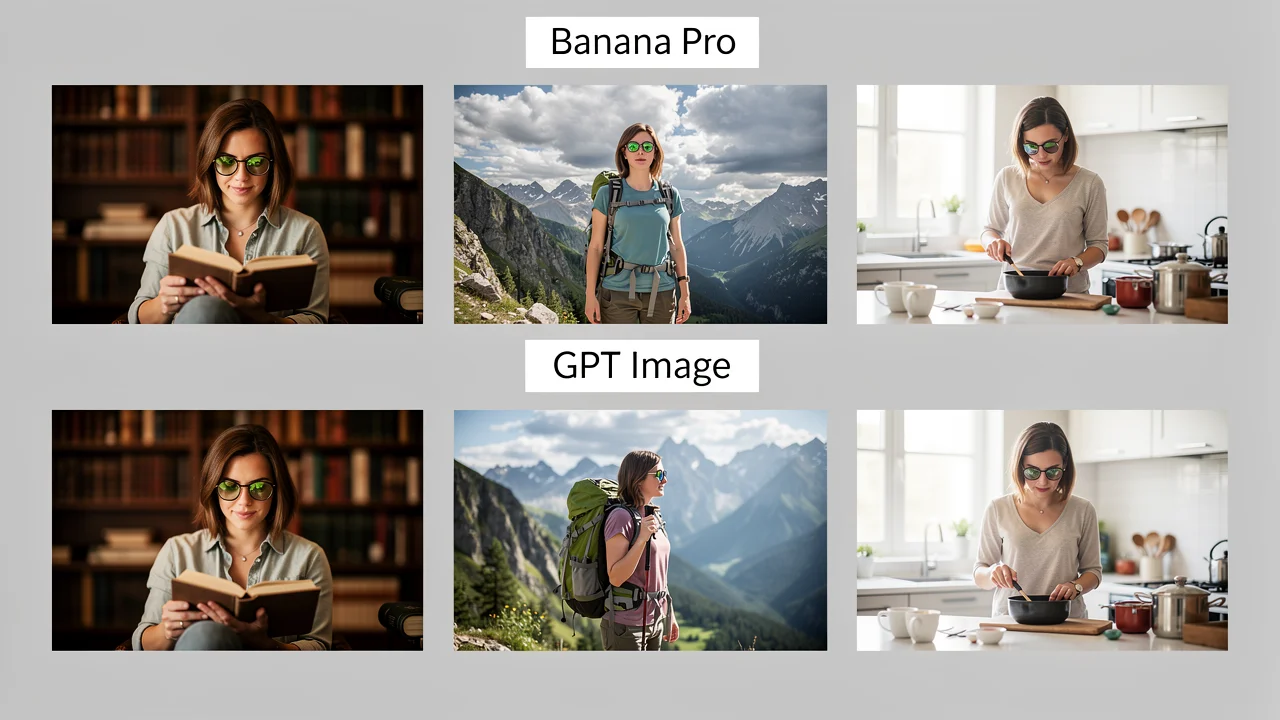
Prompt: "Generate 3 images of the same female character: (1) reading a book in a library, (2) hiking in mountains, (3) cooking in a kitchen. She has short brown hair, green eyes, and wears round glasses. Same character across all images."
Nano Banana Pro maintained impressive consistency across all three images. The character's facial features, hair style, and glasses remained recognizable in every scene. This consistency is crucial for brand characters, story illustrations, and marketing campaigns.
GPT Image 1.5 produced attractive individual images, but the character shifted between generations. Hair length varied, eye color drifted from green to hazel, and the glasses style changed. Each image was good in isolation, but placed side by side, they clearly didn't show the same person.
| Metric | GPT Image 1.5 | Nano Banana Pro |
|---|---|---|
| Facial consistency | 5/10 | 9/10 |
| Clothing/attributes | 6/10 | 8/10 |
| Individual image quality | 8/10 | 8/10 |
| Overall | 6.3/10 | 8.3/10 |
Winner: Nano Banana Pro — essential for any project requiring character consistency.
Test 5: Image Editing Precision
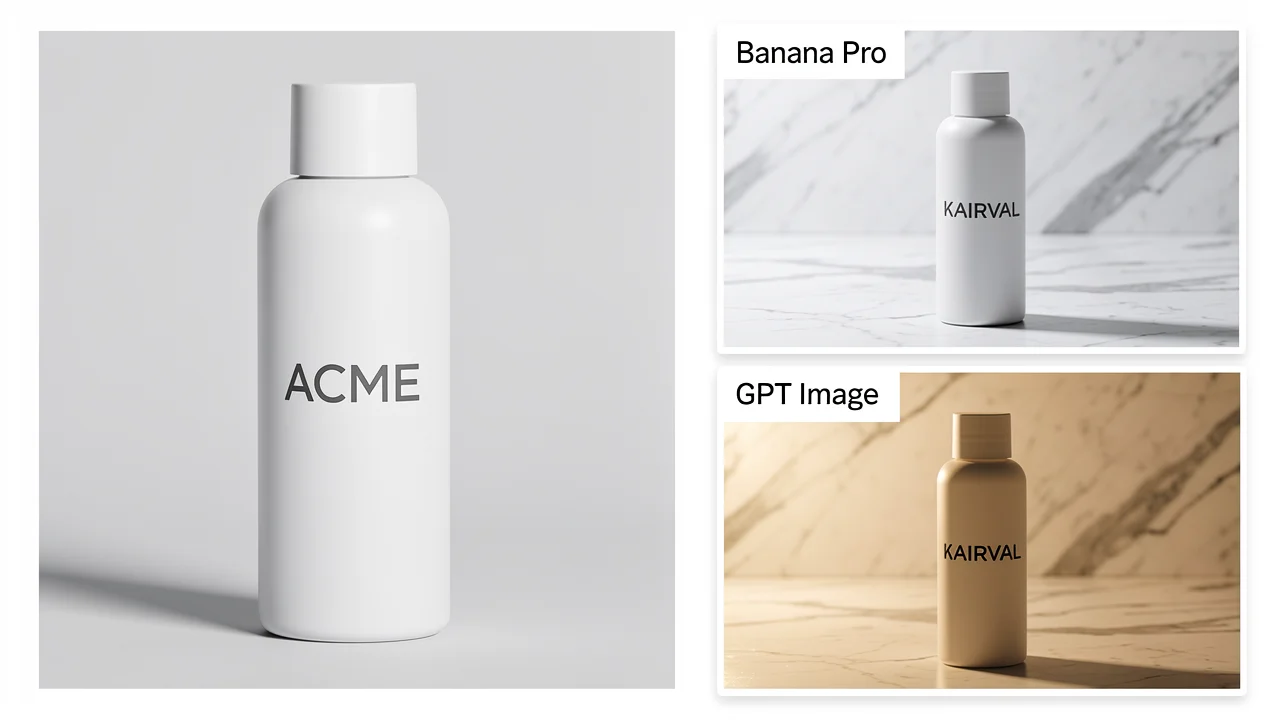
Prompt: "Take this product photo and: (1) change the background to a marble countertop, (2) replace the label text from 'ACME' to 'KAIRVAL', (3) adjust the lighting to warm tones"
Nano Banana Pro handled all three edits precisely. The text was changed correctly, the marble background looked natural, and the warm tones were applied evenly. The original product remained intact.
GPT Image 1.5 applied the warm tones beautifully and created a convincing marble background. However, the text edit introduced a typo, and the product shape was slightly altered — a common issue with GPT Image's editing approach, which tends to regenerate more of the image than strictly necessary.
Winner: Nano Banana Pro for precise edits; GPT Image for creative/transformative edits.
Pricing Comparison
Pricing for both models depends on your access method — direct API, platform subscription, or free tier. Here's how they compare:
| Pricing Factor | Nano Banana Pro | GPT Image 1.5 |
|---|---|---|
| Free access | Google AI Studio (limited) | ChatGPT free tier (limited) |
| API pricing (approx.) | $0.03-0.08/image (standard) | $0.04-0.10/image (standard) |
| High-res surcharge | None (native 4K) | Applies for >1K resolution |
| Best value platform | Kairval (both models, one subscription) | — |
Key insight: On platforms like Kairval, you can access both models under a single subscription, making the comparison less about cost and more about which model fits your specific task. Check Kairval's pricing for current plans.
Which Model Should You Choose?
The best model depends entirely on what you're creating. Here's a quick decision guide:
Choose Nano Banana Pro when you need:
- E-commerce product images — high resolution, accurate text, consistent branding
- Marketing materials — infographics, social media posts with text overlays, ad creatives
- Brand-consistent content — character consistency across multiple images
- Print-ready graphics — native 4K output without upscaling artifacts
- Precise image editing — modify specific elements without affecting the rest
Choose GPT Image 1.5 when you need:
- Photorealistic scenes — natural lighting, organic textures, candid-style images
- Creative exploration — artistic concepts, style experimentation, imaginative visuals
- Quick iterations — faster generation for rapid prototyping and brainstorming
- Social media content — eye-catching visuals where pixel-perfect accuracy isn't critical
- Transformative edits — style transfers, background replacements, creative modifications
Use both when:
- You want maximum creative range — generate with GPT Image, refine with Banana Pro
- You're building a content pipeline — GPT Image for ideation, Banana Pro for production
- You need to A/B test visuals — generate variations from both models and pick the best
Try Both Models on Kairval
The easiest way to compare Nano Banana Pro and GPT Image is to test them yourself. On Kairval, you can:
- Open the text-to-image tool and enter your prompt
- Select both models to generate the same prompt simultaneously
- Compare results side by side — resolution, text accuracy, realism, and style
- Download or share the outputs directly
This hands-on comparison tells you more than any review can. Different prompts produce different results, and the model that works best for someone else's use case might not be the best for yours.
FAQ
What is the difference between Nano Banana Pro and GPT Image?
Nano Banana Pro (Google) excels at precision, high-resolution output (up to 4K), text rendering, and character consistency. GPT Image 1.5 (OpenAI) produces more realistic lighting, handles creative prompts better, and generates images faster. Nano Banana Pro is better for professional design work; GPT Image is better for creative and artistic visuals.
Which is better for realistic images, Nano Banana Pro or GPT Image?
GPT Image 1.5 generally produces more realistic, natural-looking images with better lighting and color balance. It excels at photorealistic portraits and scenes where a natural feel matters most. Nano Banana Pro produces sharper, more polished images that look professional but can feel slightly over-processed compared to GPT Image's organic output.
Can both models handle text rendering in images?
Yes, but with different accuracy levels. Nano Banana Pro is significantly better at rendering text in images — it handles complex layouts, multiple text blocks, and precise character placement more reliably. GPT Image 1.5 can render text but often introduces typos, especially with longer phrases or multiple text elements.
What is the pricing difference between Nano Banana Pro and GPT Image?
Pricing depends on the platform. Through API access, both models charge per image based on resolution. Nano Banana Pro tends to be more cost-effective for high-resolution outputs (2K/4K) since it natively supports these resolutions. GPT Image may require multiple generations to achieve similar quality at high resolutions. Try both for free on Kairval to compare value.
Which model is better for commercial and professional use?
Nano Banana Pro is better for commercial use cases — product mockups, marketing materials, brand-consistent imagery, and graphic design. Its higher resolution, better text rendering, and superior consistency across multiple generations make it more reliable for professional workflows. GPT Image is better for creative exploration and artistic projects.
Is Nano Banana Pro free to use?
Google offers limited free access to Nano Banana Pro through Google AI Studio. For production use, API pricing applies. On Kairval, you can try Nano Banana Pro and GPT Image side by side with free credits to compare outputs before committing to a subscription.
Can I use both models for image editing?
Yes, both models support image editing. Nano Banana Pro offers more precise edits — you can modify specific elements, adjust text, and change colors while maintaining the rest of the image. GPT Image handles creative edits well (style transfers, background changes) but may alter unintended parts of the image during editing.
Conclusion
There's no single winner in the Nano Banana Pro vs GPT Image debate — there's only the right tool for your specific job. Nano Banana Pro dominates in precision: 4K resolution, text accuracy, character consistency, and professional-grade output. GPT Image 1.5 shines in creativity: realistic lighting, artistic flexibility, and fast iteration.
The smartest approach? Use both. Start with GPT Image for creative exploration, then refine with Nano Banana Pro for production-quality output. On Kairval, you have access to both models (and dozens more) under one subscription — so you don't have to choose sides.
Try generating the same prompt with both models today and see which one matches your vision.

![Gemini vs ChatGPT: Which AI Is Better? [2026]](/kairval/images/blog/00ede4e2-92de-421e-b378-ac6d2ba8fa05.webp "Gemini vs ChatGPT: Which AI Is Better? [2026]")